

Get Started with AINAV
A Guide to How
AINAV Works
From Simple Instructions to Real Execution
More Than an AI That Answers Questions
An AI That Understands Workflows
What Is the Guided Experience in AINAV?
The Guided page is designed to help you understand how AINAV operates behind the scenes. AINAV does more than receive instructions and generate text responses. It is built to first understand your objective, then determine whether your request requires:
- A conceptual response
- File creation
- File reading and analysis
- Script execution
- Terminal command execution
- System monitoring
- Infrastructure analysis
- Document generation
- Multi-step workflow execution
By taking this approach, AINAV helps you work more efficiently while maintaining transparency, safety, and control throughout the process.
The Structured Workflow Behind AINAV
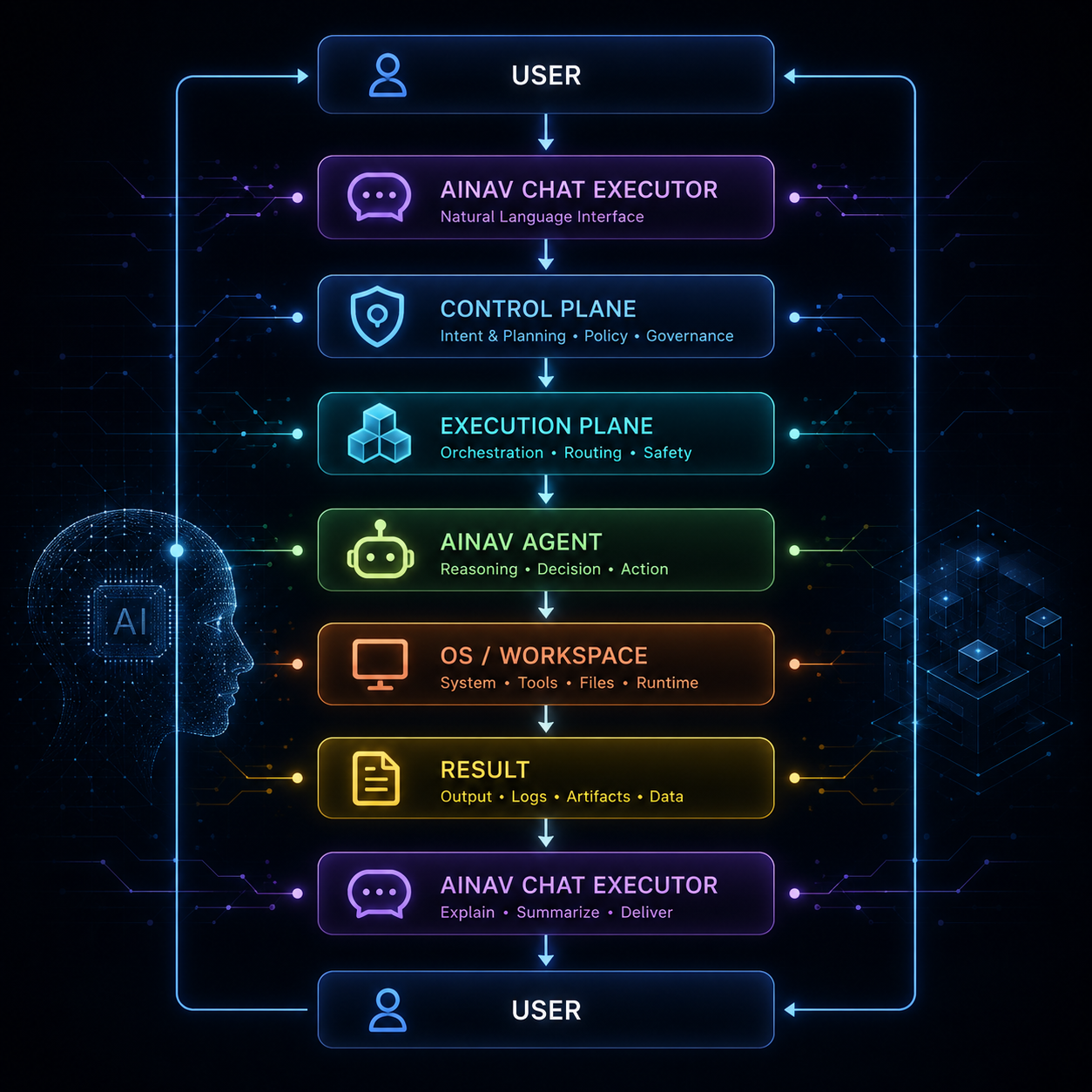
AINAV Endpoints and How They Work
Get to Know the Tools That Power AINAV
File & Workspace Endpoints
WRITE FILE
Purpose: Create a new file or overwrite the contents of an existing file within the workspace.
How It Works: AINAV receives a file creation request, determines the destination path, prepares the content, and writes it to the workspace.
Ideal for
- Creating source code
- Generating configuration files
- Creating text documents
- Building automation scripts
- Saving workflow outputs
Example Instruction: "Create a README.md file for my project."
Key Value: Helps you create work artifacts without manually writing everything from scratch.
read FILE
Purpose: Read the contents of a file within the workspace.
How It Works: AINAV opens the requested file, reads its content, and uses the actual data as the basis for analysis or responses.
Ideal for
- Source code audits
- Debugging
- Configuration reviews
- Document analysis
- Error investigation
Example Instruction: "Read app.py and explain what it does."
Key Value: AINAV does not guess file contents, it analyzes real data before providing insights.
delete file
Purpose: Delete files from the AINAV workspace.
How It Works: AINAV removes the specified file from the sandbox workspace according to the user's instructions.
Ideal for
- Cleaning temporary files
- Removing test files
- Deleting unnecessary artifacts
- Workspace cleanup
Example Instruction: "Delete temp.log."
Key Value: Helps keep your workspace clean and organized.
file system list
Purpose: View files and folders within a workspace.
How It Works: AINAV scans the specified directory and displays its contents.
Ideal for
- Reviewing project contents
- Auditing folder structures
- Locating files
- Understanding a workspace before execution
Example Instruction: "Show me the contents of my project folder."
Key Value: Provides visibility before taking action.
file system move
Purpose: Move or rename files and folders.
How It Works: AINAV transfers files or folders from one location to another within the workspace.
Ideal for
- Renaming files
- Organizing project structures
- Moving reports to designated folders
- Archiving older files
Example Instruction: "Move report.pdf to the reports folder."
Key Value: Helps maintain a structured and organized workspace.
file system copy
Purpose: Copy files or folders.
How It Works: AINAV creates a duplicate of the source file or folder at the target location.
Ideal for
- File backups
- Configuration duplication
- Creating templates
- Saving versions before applying patches
Example Instruction: "Copy config.yaml to the backup folder."
Key Value: Provides an additional layer of safety before making changes.
file system mkdir
Purpose: Create new folders.
How It Works: AINAV creates directories based on the specified path.
Ideal for
- Building project structures
- Creating log folders
- Creating report folders
- Initializing workspaces
Example Instruction: "Create logs and reports folders."
Key Value: Helps establish a clean and organized project structure from the start.
file system info
Purpose: View file or folder metadata.
How It Works: AINAV retrieves information such as file type, size, modification date, and other available metadata.
Ideal for
- Checking file sizes
- Verifying file existence
- Metadata audits
- Validating files before actions are performed
Example Instruction: "Show information for report.pdf."
Key Value: Helps validate resources before and after execution.
Execution & Runtime Endpoints
execute file
Purpose: Run scripts or executable files located in the AINAV workspace.
How It Works: AINAV executes the target file, captures runtime output, and analyzes stdout and stderr to understand the results.
Ideal for
- Running Python scripts
- Operating bots
- Executing automation workflows
- Runtime testing
- Persistent processes such as bots or daemons
Example Instruction: "Run bot.py."
Key Value: AINAV can observe runtime behavior and assist with troubleshooting when errors occur.
run command
Purpose: Execute terminal commands that require advanced orchestration.
How It Works: AINAV sends commands to the host shell and monitors command output either in real time or synchronously, depending on the workflow requirements.
Ideal for
- Installing dependencies
- pip install
- npm install
- git clone
- Docker operations
- Starting development servers
- Commands requiring streamed output
Example Instruction: "Install the requests package using pip."
Key Value: Provides powerful terminal orchestration capabilities for advanced technical workflows.
command
Purpose: Execute lightweight operating system commands.
How It Works: AINAV runs a single command and returns the result immediately.
Ideal for
- Checking active users
- Basic network tests
- IP address checks
- Process termination
- Quick directory listings
- Lightweight diagnostics
Example Instruction: "Check this computer's IP address."
Key Value: Fast, simple and efficient for everyday operating system tasks.
double click
Purpose: Open files or folders visually within the workspace.
How It Works: AINAV triggers an open action similar to a double-click event on the specified path.
Ideal for
- Opening work output folders
- Viewing reports
- Opening files with default applications
- Displaying results visually
Example Instruction: "Open the reports folder."
Key Value: Makes generated work easier to access and review.
Monitoring & Observability Endpoints
system metric
Purpose: Collect real-time system telemetry.
How It Works: AINAV triggers an open action similar to a double-click event on the specified path.
Ideal for
- System health checks
- Server monitoring
- Resource validation before deployments
- Bottleneck detection
- Operational observability
Example Instruction: "Check CPU, memory, and disk usage."
Key Value: Provides actual system data rather than assumptions.
ai ops
Purpose: Analyze telemetry, anomalies, risks, root causes, and operational recommendations.
How It Works: AINAV applies observability intelligence to interpret system conditions and generate advanced operational insights.
Ideal for
- Performance analysis
- Anomaly detection
- Root cause analysis
- Remediation planning
- Infrastructure intelligence
Example Instruction: "Analyze the server condition and provide recommendations."
Key Value: Helps users understand not only what happened, but also what it means and what to do next.
Other Available Endpoints
document universal render
Purpose: Generate professional documents in multiple formats.
How It Works: AINAV organizes collected data into a structured document and renders it into the selected format. (PDF, DOCX, XLSX, PPTX, JSON)
Ideal for
- Audit reports
- System reports
- Monitoring reports
- Project documentation
- Client reports
- Executive summaries
Example Instruction: "Generate a system audit report in PDF and DOCX."
Key Value: Transforms technical outputs into polished, shareable documents.
PYTHON SANDBOX EXECUTE
Purpose: Execute temporary Python code in a secure and isolated environment.
How It Works: AINAV runs Python snippets within a sandbox, captures stdout and stderr, and returns the execution results.
Ideal for
- Logic validation
- Python snippet testing
- Code experimentation
- Learning programming
- Syntax verification
- Temporary calculations
Example Instruction: "Test whether this Python function produces the correct result."
Key Value: Allows users to experiment with code safely before applying it to production projects.